Primary Parent Information
Welcome
The information on this page is designed to support a smooth and successful start, offering practical guidance and helpful tips as you prepare for the year ahead. We look forward to welcoming you to our School community and seeing you soon. If you need to meet with your child's teacher before school starts, please telephone the office on 9247 2242 to make an appointment.
The Parent Handbook provides a summary of the key policies and procedures of JSR. We encourage you to read it carefully and use it as the first point of reference when you have any queries about the expectations and procedures the School has established. The Parent Handbook is accessed via this link.

Key Information
Calendar and Key Dates
The School calendar and term dates for each year are published on the School website. Parents are strongly encouraged to subscribe to the JSR Community Calendar via SEQTA or download a simple overview via this link.
Key dates and events for the beginning weeks of school:
HeadStart Day: Friday 29 January 8.45-11.45am
First day for all students: Monday 1 February
Welcome to school parent sundowner: Week 2, date to be advised. This is a chance for you to connect with other parents and staff before moving into your child’s classroom, where the teachers will be happy to take questions specific to your classroom (parent rosters etc) and year level. You will receive information about this event closer to the time.
Early in the new year, all students will receive a letter from their new teacher to introduce themselves. All teaching staff return to school the week before students commence. Should you require an appointment with your child’s teacher before they begin, please telephone the office on 9247 2242, who will be able to put you in contact with them.
Parent Interviews and Communication
The School communicates most information via email or the School App. Teachers utilise the student diary in the first instance to communicate with you and keep the class portal page current. The class portal page can be found by logging into SEQTA Engage. The teachers keep this updated with a class newsletter, photographs of activities undertaken in Kindergarten, and reminders for upcoming events.
All students are issued a school diary in the first week of school. Hard copies of notes and communications will be available via your child’s diary or emailed directly to parents. Please check the diary daily and return it to school the next morning. The diary is a valuable means of communication between home and school. Please get into the habit of looking for information in the diary from the teacher, and in the same manner, use the diary for any comments you might need to make. Please check your email on a regular basis to ensure you are up to date with scheduled events, as well as checking class portal page for reminders relating to upcoming school or class events.
In Term One, parents are strongly encouraged to make an appointment with the class teacher to discuss any important information pertinent to their child. Open communication is always encouraged, and you are more than welcome to make appointments with your class teacher at any time during the year.
SEQTA and the JSR School App
SEQTA Engage – the parents’ portal that allows access to the information available to students in SEQTA Learn, but with the ability for parents to access their children’s Pastoral Care and attendance summaries as well as Semester Reports. You can also use SEQTA to log any absences from School and pay your school fees.
Access to SEQTA is through the app. The connection is secure, and login and password details are configured for each user. Parents can only access timetable, course, and assessment information specific to their children.
The JSR App is an essential communication tool within the community. All year group notices, newsletters and letters from the Principal at distibuted via the App. It also provides links to all essential resources for parents.
Please make use of our Communications Cheat Sheet to help explain the key communication channels used at JSR.
Consent2Go
Consent2Go is a platfrom that provides for:
- Gathering student health information
- Photo permission
- Excursion and camp permissions and payment
- Parents to update to contact details
As all parents would appreciate, the accuracy and management of student health records is a critical process for all schools. Government legislation in this space is placing further responsibilities on schools, while also requiring clear and consistent communication between schools and families to ensure that optimum care is provided for all students.
Consent2Go allows the school to capture and confirm health information and permissions for your child in an accurate and timely manner through a secure process. There are a multitude of benefits and opportunities that are achieved by using this system, with positive advancements in areas such as excursion approvals, risk management and sports communication and management. It is also important to note that Consent2Go is compliant with all of the Australia Privacy principles.
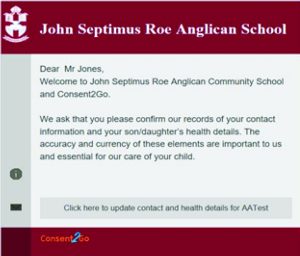
The picture (see below) shows the style of the message that will be received by parents of new students.
Should you encounter any questions through your completion of this process, there is a ‘Need Help?’ icon at the top right of each screen, and the technicians at Consent2Go will be available to assist you with your inquiry. As always, Administration staff can be contacted for matters pertinent and specific to the school.
Photography and Video
Teachers will use photographs and videos for learning and assessment opportunities or to record school events. The school has an online presence, including a website and social media. It is imperative that you indicate if you do not give permission for your child’s photo to be taken or used in publications and on social media platforms. This can be done via Consent2Go.
We also use a secure biometric photo management platform called Pixevity. We primarily use this program to identify students based on photo permissions; however, we have recently invited the JSR community to join Pixevity so that you may view and download photos of their children.
Pixevity is designed to give parents greater visibility of school life by allowing you to view photos taken of your child during school activities and events, all within a secure, parent-only environment. We know how meaningful it can be to see your child learning, engaging and thriving at school, and this platform supports that connection.
Please note: We do not share any personal information, including children’s full names online. If you choose not to grant photo permissions, we cannot share images of your child with their friends on the Pixevity platform.
Collection of Students
School begins at 8.45am, with classrooms open from 8.30am. Supervision is available from 8.20am on the oval and internal areas. Students should not arrive before this time.
Pre-Primary and Year 1 students are dropped off via Thyme Court (enter at the Vietnamese Church). Staff supervise from 8.30am and escort students to class. This is a drop-off zone only; parking is reserved for Pre-Kindy and Kindy families. Year 2–6 drop-off is further along Thyme Court near the Primary Oval shelters.
Pick-up is at 3.20pm (Tue–Fri) and 2.20pm (Mon). Students are supervised at all points. Older siblings may wait with younger siblings at the Junior Primary area. If the youngest child is Year 2 or above, collection is from Upper Primary.
Please notify the class teacher in advance if someone else will collect your child.
Parking
As you can imagine, parking is at a premium on the campus. Parking spaces are a priority for Pre-Kindergarten and Kindergarten students only. Throughout the year, PP-6 students should utilise the pickup and drop-off facilities provided by the school.
School Unifrom
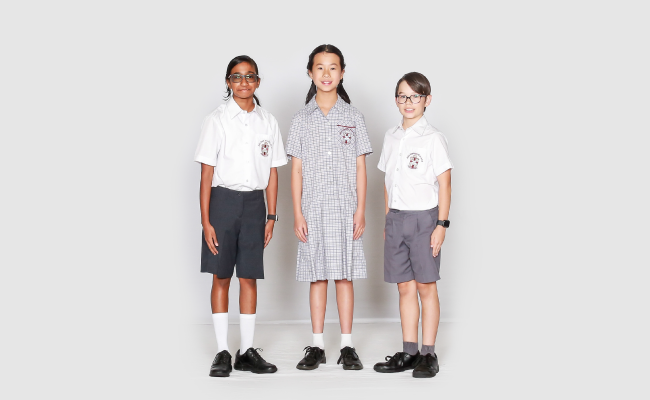
Please help us by ensuring your child is wearing the correct school uniform. At JSR, there is a uniform guideline that all students should abide by. We often see frilly socks, incorrect shoes, and non-uniform hair adornments. We encourage our students to take their shoes and socks off when playing outside for some activities. We teach them to place their socks inside their shoes before going off to play.
Please refer to your uniform requirements information page in the Parent Handbook for further details. Please make sure that your child has a set of spare school clothing as accidents can happen on the odd occasion. Please label all items of clothing with your child’s first and last name.
Morning Tea and Lunch
Please send your child to school with morning tea and lunch from home. Packing them in separate containers helps children to understand what they should eat at each break time until they are better able to manage their food for the day.
Drink bottles should contain water. Some parents choose to provide a frozen fruit juice box or equivalent, to help keep lunches cool during the day (cordial or other high sugar drinks are not appropriate). Alternatively, you can include a frozen ice pack or a water bottle to help keep their lunches cool during summer.
Some students prefer a warm lunch in the cooler months and will bring small thermos containers. Please refrain from including lollies, chocolate, or high-sugar foods or drinks. Fast Foods (McDonald’s, Red Rooster, Hungry Jack’s, etc) should not be dropped off. These foods are inappropriate for a school day.
JSR is an allergy-aware school, and families are asked to support us by not packing nut products in their child’s lunchbox. The Canteen is available for Primary students to order their lunch. Lunch orders need to be placed in the box in your child’s classroom at the beginning of the school day if you are not ordering online.
Primary Students have the option to order online via Flexischools. Flexischools is a fast and secure way to order and pay online. A link to Flexischool is available on the School website under the ‘Parents’ heading or go to www.flexischools.com.au.
Labelling Equipment
Please clearly label your child’s school bag, all items of uniform (including shoes), lunch box, drink bottle, and art shirt.
All children in Pre-Primary to Year 6 should have their own art shirt and are required to have this at school on the day of their art lessons. Please ensure your child’s art shirt is clearly labelled with permanent/washable ink.
Swimming Lessons
Swimming lessons are part of the curriculum for primary students and take place in Term 4 each year at the Ballajura Aquatic Centre.
Parent Concerns: Learning / Curriculum
JSR has a specific procedure to follow if you need to discuss any concerns or queries about your child’s learning programme. Raise any issue or concern first with the classroom teacher. If you need further clarification, please make an appointment with the Director of Teaching and Learning. If you have addressed your concerns with either of these staff members and still require further clarification, please schedule an appointment with the Associate Principal.
Parent Concerns: Behaviour
Please follow the above instructions and meet with the class teacher first. If you need further clarification regarding behaviour issues, please make an appointment with the Director of Pastoral Care. If you have addressed your concerns with either of these staff members and still require further clarification, please schedule an appointment with the Associate Principal.
Out of School Care
This programme is operated by the School for any students in Pre-Kindy to Year 6. PK students are welcome to attend Before, After and Vacation care on days they would normally be enrolled at school.
There are three components:
- Before School Care:00am – 8.30am each weekday (each student school day).
- After School Care:30pm -6.00pm on Monday, and 3.20pm – 6.00pm Tuesday to Friday.
- Vacation Care: 7am–6.00pm each weekday (excluding public holidays and a defined Christmas/New Year break).
Learn to Play and Instrument
Learning to play an instrument or to sing can help the mind develop and grow, which can assist your understanding of other subjects. Our musicians often represent the School in festivals, competitions, overseas music tours and concerts in the community and at school. For further information regarding instrumental lessons, please refer to the music button on the main SEQTA portal page for parents.

Useful Resources for Parents
For useful information and quick links, please visit our Parent Resources page. We strongly recommend downloading the JSR School App to receive all school communications and the SEQTA App for all educational/learning information specific to your child.